
What is a Sitemap: How to Create One and Submit It


If you want your website to rank well in search engines like Google, one of the most overlooked yet crucial tools you need is a sitemap. Whether you run a blog, an online store, or a business website, a sitemap helps search engines discover, crawl, and index your content more efficiently.
In this guide, we’ll walk through what a sitemap is, why it’s important, the different types, how to create one, and how to submit it to search engines. By the end, you’ll have everything you need to improve your site’s visibility.
What Is a Sitemap?
A sitemap is a file that lists all the important pages on your website. Think of it as a roadmap for search engines like Google, Bing, or Yahoo—it tells them where your pages are, how they’re connected, and how often they’re updated.
Sitemaps are usually written in XML (Extensible Markup Language) because search engines can easily read that format. However, there are other types too (we’ll cover them soon).
Here’s a simple example of an XML sitemap
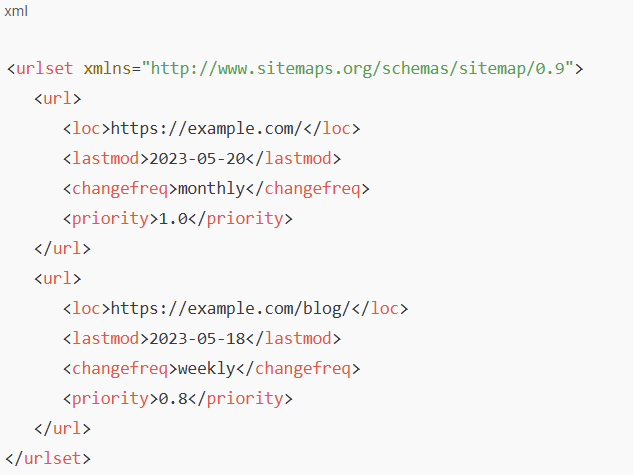
This code tells Google:
- The homepage exists.
- It was last modified on May 20.
- It’s important (
priority 1.0). - It changes monthly.
Why Is a Sitemap Important?
Even if your website has a clear structure, search engines might miss some pages. A sitemap ensures that doesn’t happen. Here’s why it matters:
- Faster Indexing: New pages or blog posts get discovered quicker.
- Better Crawl Efficiency: Google knows which pages are most important and how often they change.
- Helps Large Sites: If you run an e-commerce store with hundreds of products, a sitemap ensures none are overlooked.
- Fixes Crawl Issues: Pages deep within your site structure may otherwise go unnoticed.
- Supports Rich Media: You can include images, videos, or news-specific content.
In short: if you want better SEO results, you need a sitemap.
Types of Sitemaps
Not all sitemaps are the same. Here are the main types:
a) XML Sitemaps
- The most common type.
- Written in XML.
- Created for search engines (not humans).
b) HTML Sitemaps
- Built for visitors, not search engines.
- Lists all pages in a simple, clickable format.
- Useful for user navigation.
c) Video Sitemaps
- Designed for sites with video content.
- Helps Google understand video metadata (title, description, duration).
d) Image Sitemaps
- Ensures images (like product photos or infographics) are properly indexed.
e) News Sitemaps
- For publishers or news sites.
- Helps Google News discover recent articles quickly.
For most websites, an XML sitemap is enough. But if you run a specialized site (like one with lots of videos or news), consider additional formats.
How to Create a Sitemap
Creating a sitemap isn’t as complicated as it sounds. You can do it manually or use tools that generate one automatically.
a) Manual Creation (For Developers)
If you like coding, you can write an XML sitemap by hand. This gives you full control but is time-consuming.
b) Using Plugins (For WordPress Users)
- Yoast SEO: Automatically generates and updates sitemaps.
- Rank Math: Another powerful SEO plugin with sitemap features.
- All in One SEO: Easy setup, perfect for beginners.
c) Online Sitemap Generators
If you don’t use WordPress, try tools like:
- XML-Sitemaps.com
- Screaming Frog SEO Spider (desktop software)
d) For E-Commerce Platforms
Most platforms like Shopify, Wix, and Squarespace automatically generate sitemaps. You can usually find yours by adding /sitemap.xml at the end of your domain.
👉 Example:https://yourwebsite.com/sitemap.xml
Best Practices for Sitemaps
Creating a sitemap is one thing; optimizing it is another. Follow these tips:
- Include only important URLs: Don’t add duplicate or “thin” content pages.
- Keep it updated: Make sure new pages are added automatically.
- Stay under limits: Each sitemap can contain up to 50,000 URLs or be 50MB in size. For larger sites, use a sitemap index file.
- Use canonical URLs: Avoid confusing Google with duplicate versions.
- Check regularly: Use Google Search Console to monitor sitemap errors.
How to Submit a Sitemap to Search Engines
Once your sitemap is ready, you need to tell search engines about it.
a) Submit to Google
- Go to Google Search Console.
- Choose your website property.
- In the left menu, click “Sitemaps”.
- Enter your sitemap URL (e.g.,
https://yourwebsite.com/sitemap.xml). - Click “Submit.”
Google will now crawl it regularly.
b) Submit to Bing
- Sign in to Bing Webmaster Tools.
- Select your website.
- Go to “Sitemaps”.
- Add your sitemap URL.
- Click “Submit.”
c) Other Search Engines
- Yahoo is powered by Bing, so submission there covers both.
- Yandex (popular in Russia) also accepts sitemaps via its webmaster tools.
Common Sitemap Mistakes to Avoid
Even though sitemaps are simple, many site owners make mistakes. Watch out for these:
- Including blocked pages: If a page is disallowed in
robots.txt, don’t list it in the sitemap. - Using incorrect URLs: Make sure URLs are absolute (full path), not relative.
- Not updating: If your sitemap is outdated, Google won’t see your new content.
- Submitting multiple conflicting sitemaps: Keep it clean and consolidated.
- Forgetting HTTPS: Always use the correct protocol (https vs http).
How to Check If Your Sitemap Works
After submission, you should verify that search engines are using it correctly:
- In Google Search Console, check the “Coverage” report. It shows how many pages were indexed from your sitemap.
- Use tools like Screaming Frog or Sitebulb to audit sitemaps.
- Simply visit your sitemap URL in a browser to ensure it loads properly.
Do You Really Need a Sitemap?
Not all websites must have a sitemap. Google itself says:
- You may not need one if your site has fewer than 500 pages, is well-linked, and doesn’t use lots of media or dynamic pages.
- You definitely need one if:
- Your site is new (few backlinks).
- Your site is large (hundreds or thousands of pages).
- Your site uses rich media (videos, images, news).
- You want Google to index your content faster.
For most website owners, the effort is small but the benefits are huge.
Final Thoughts
A sitemap may not guarantee top rankings, but it improves your chances of being discovered and indexed quickly. Think of it as guiding Google through your site with a flashlight, ensuring no page gets left in the dark.
To recap:
- A sitemap is a road map for search engines.
- It’s especially important for large or complex sites.
- You can create one manually, with plugins, or with online tools.
- Submit it to Google and Bing for better indexing.
- Keep it updated and error-free.
If SEO is a marathon, a sitemap is like handing Google the course map—it makes the journey smoother and faster.
Suggestion URL:- 10 Best XML Sitemap Generator Tools